
Introduction
macbroidery earned its place in embroidery-software history because it tackled a problem Mac users knew well: finding embroidery software that actually fit their computer environment. Its appeal came from practical tools rather than flashy promises. Users could work with embroidery lettering, arrange designs, preview projects, and save embroidery files in formats used by different machine brands. Today, though, there is an important catch. macbroidery is discontinued, so its original capabilities and its usefulness on a modern Mac are two very different questions.
That distinction should be clear from the start. If you are researching an old embroidery setup, trying to understand an existing design collection, or simply investigating software that once served Mac embroidery users, macbroidery is worth looking at. If you are searching for software to build a new embroidery workflow today, its discontinued status changes the conversation considerably.
Where macbroidery Fit Into Mac Embroidery
Mac users have not always had the same selection of embroidery applications available to them as Windows users. That made a dedicated Mac-focused embroidery program valuable, particularly for home embroiderers who already preferred Apple’s computers.
macbroidery was built around that environment.
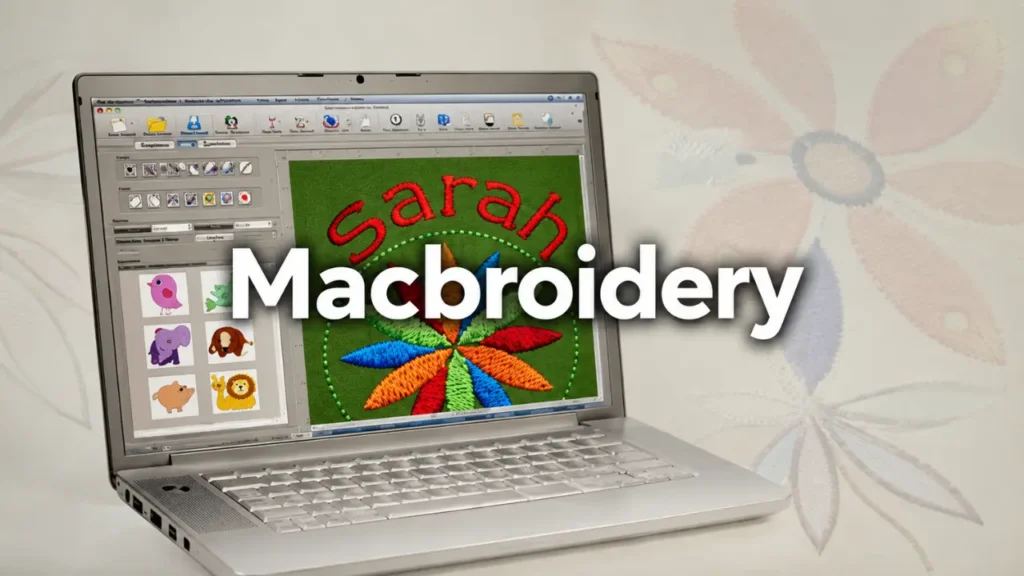
Its practical appeal was the combination of embroidery lettering and design preparation. Instead of treating lettering as an afterthought, the software gave users tools for working with embroidery fonts and positioning text within a design.
That matters because embroidered lettering behaves differently from ordinary computer text. A font that looks attractive on a screen may not produce attractive stitches at every size. Spacing, proportions, stitch construction, and placement all influence the finished result.
macbroidery gave users a way to make those adjustments before sending a project to an embroidery machine.
The software also included templates and design-preview functions. For anyone personalizing clothing or other fabric items, that could be more useful than it sounds. A design needs to work on the actual item, not just look good inside a software window.
The Lettering Tools Were One of Its Main Strengths
Embroidery lettering was a natural use for macbroidery.
The software included pre-digitized fonts, allowing users to create text intended specifically for embroidery rather than relying on ordinary desktop typography. That distinction is important when working on names, initials, short phrases, monograms, and personalized garments.
A typical project might begin with a simple name. The user could choose an embroidery font, adjust the lettering, position it within the design, and preview the result before stitching.
That workflow was particularly useful for small businesses and hobbyists producing personalized items.
A name embroidered across a shirt, for example, needs different treatment from a large decorative design on a jacket. The available space, intended viewing distance, garment shape, and surrounding details all influence the final choice.
macbroidery gave users control over the digital arrangement before committing thread and fabric.
That is one reason the software remains interesting when researching older Mac embroidery workflows.
Design Editing Made the Software More Practical
macbroidery was not limited to typing text and pressing save.
Its design tools allowed users to manipulate embroidery projects and make adjustments to their layouts. The ability to change size, positioning, alignment, spacing, and rotation gave users more control over the finished composition.
That matters because embroidery design is often a process of adjustment.
A design can technically fit within an embroidery hoop and still look poorly balanced. Text may be too close to an existing element. A monogram might need to be moved slightly. A design could need resizing to suit a particular garment.
Being able to make those changes on the computer is much easier than discovering the problem after the machine has started stitching.
The software’s preview capabilities also helped users judge the appearance of a project before production.
For embroidery, that kind of preparation has real value. Thread, stabilizer, garments, and machine time all cost something. Preventing an obvious design-placement mistake before stitching is preferable to fixing it afterward.
macbroidery Supported More Than One Embroidery Machine Format
One of the strongest practical features documented for macbroidery was its ability to save designs in different embroidery formats.
Brother’s documentation identifies BRFM as the default MacBroidery outline format. It also lists machine-oriented formats including PES, SEW, JEF, HUS, PCS, DST, XXX, EXP, SHV, VIP, and VP3.
That broad format support was important because embroidery machines do not all rely on one universal file type.
A Brother or Baby Lock user might need PES. A Janome or Elna workflow could involve JEF. DST is associated with Tajima machines, while other formats were used across different embroidery systems.
The important point is that a design file is not simply an image. It contains stitch instructions intended to be interpreted by embroidery equipment.
This is why choosing the right format matters.
A design may look perfect inside software and still be unsuitable for a particular machine if it has been saved in the wrong format. Brother’s current support documentation also warns that individual machines have specific supported formats, reinforcing the need to check the machine’s own requirements rather than assuming every embroidery file will work.
BRFM and Machine Formats Serve Different Purposes
The distinction between BRFM and machine stitch formats is worth understanding when looking at old macbroidery projects.
BRFM was the software’s default outline format. A working or outline format can preserve design information that is useful while editing a project.
Machine formats, on the other hand, are intended to provide stitch information that embroidery equipment can use.
That difference becomes important when editing an old project.
A machine-ready stitch file is not necessarily as flexible to edit as an editable project file. Once design information has been converted into machine-specific stitches, changing the underlying design can become more difficult.
For someone recovering old macbroidery files, preserving the original files can therefore be valuable. If an editable project exists, it is usually preferable to keep that original rather than relying only on an exported machine file.
This is especially relevant when the design needs to be resized, modified, or adapted later.
Templates and Preview Tools Added Real-World Value
One of the more practical aspects of macbroidery was its use of templates and previews.
Embroidery design is not performed in a vacuum. The same lettering can look appropriate on one garment and awkward on another.
A design intended for the chest of a shirt needs different positioning from one intended for a sleeve. A monogram on a towel has different visual requirements from a large decorative design on a jacket.
Templates help users think about those physical constraints before stitching begins.
The preview tools also gave users an opportunity to inspect the project digitally. That does not replace a physical test stitch, but it can expose obvious layout problems early.
For hobbyists producing personalized work, this kind of workflow can be more useful than a huge collection of advanced tools they never intend to use.
macbroidery Was Not the Same as Advanced Professional Digitizing Software
This is an important distinction when evaluating old software.
Embroidery editing and embroidery digitizing are related, but they are not the same job.
Editing can involve modifying an existing embroidery design, adding lettering, changing placement, adjusting size, or arranging elements.
Digitizing involves converting artwork into embroidery instructions and controlling the way stitches are constructed.
Someone looking for macbroidery because they want to add a name to an existing embroidery design has a different requirement from someone who wants to turn a detailed logo into a production-ready embroidery file.
That difference should influence expectations.
macbroidery’s lettering and design-editing capabilities made it useful for personalization and preparation. It should not automatically be treated as equivalent to every professional digitizing application simply because it could save embroidery files.
The age of the software also matters. Modern embroidery programs can offer extensive controls for stitch types, density, underlay, sequencing, compensation, and other technical details. Comparing an older program with a current professional digitizing suite feature by feature is therefore not particularly useful unless the specific workflow is clear.
The Biggest Problem With macbroidery Today Is Its Age
The most important current fact about macbroidery is not a design feature.
It is its discontinued status.
Brother’s current software compatibility documentation states that MacBroidery was retired by Pulse Micro in 2018 and was not compatible with High Sierra.
That information changes how the software should be discussed today.
An old feature list can make macbroidery look like an ordinary software choice. It is not. It is legacy software.
Someone who already has a functioning older setup may have good reasons to keep using it. A person starting from zero has a different situation.
Current Mac operating systems have changed considerably since macbroidery was retired. Compatibility problems can involve more than the application itself. Drivers, file associations, installation systems, licensing, machine connections, and other parts of an older workflow may also depend on the computing environment in which the software originally operated.
That makes the age of the entire setup important.
Why Compatibility Should Come Before Installation
Finding an old copy of macbroidery does not automatically mean that it is ready to use.
Before relying on an old embroidery application, the computer, operating system, embroidery machine, and design files all need to make sense together.
The first question is the Mac’s operating-system version.
The second is the embroidery machine.
The third is the file format required by that machine.
The fourth is whether the old software installation and any associated licensing system still function.
Ignoring those questions can lead to wasted time.
This is particularly important when an old computer contains valuable embroidery designs. Updating the operating system without first checking the software can potentially disrupt a workflow that was still functioning.
For legacy equipment, stability can be more valuable than having the newest operating system.
macbroidery Still Has Value for Legacy Embroidery Projects
Discontinued does not mean irrelevant.
There is a difference between software being unsuitable as a new purchase and software being valuable inside an existing workflow.
If someone inherited an old Mac with macbroidery already installed, along with a collection of embroidery designs, the software may be part of a functioning historical setup.
In that situation, the goal is not necessarily to replace everything.
The priority is to understand what already exists.
Old BRFM projects may contain information that is not available in a machine-ready export. Existing PES, JEF, DST, or other stitch files may also be useful depending on the machine involved.
Preserving original design files is therefore sensible when working with a legacy collection.
If a design matters, keep the original before experimenting with conversions or edits.
That simple precaution can make future recovery much easier.
Why File Conversion Deserves Caution
Embroidery file conversion sounds straightforward, but the result is not always identical to the original project.
Machine formats encode stitch information differently, and a converted file may not retain every piece of editable design information from the original working file.
This is one reason the original macbroidery project format can be important when available.
A user who only has a machine file may still be able to work with it in another embroidery application, but editing possibilities can be more limited.
The safest approach with an important design is to keep the original and treat exported machine files as production copies.
This becomes particularly important for personalized designs that would be difficult to recreate.
Who Would Have Gotten the Most From macbroidery?
macbroidery made the most sense for users whose embroidery work revolved around personalization and design preparation.
A home embroiderer creating names and monograms could benefit from the lettering tools.
A person preparing designs for different machine formats could benefit from the range of supported exports.
Someone working with garments could make use of templates and previews.
A user who already preferred Mac computers could appreciate having embroidery software designed for that platform rather than trying to build a workaround around another operating system.
Those are concrete strengths.
The software becomes a less attractive proposition when the requirement shifts toward modern professional production, advanced digitizing, current operating-system support, or a long-term workflow that needs active development.
The Current Mac Situation Makes the History More Interesting
There is an interesting contrast between macbroidery’s original purpose and its current status.
The software existed to give Mac users a dedicated embroidery option. Today, Brother’s support page says there is currently no embroidery software compatible with Macintosh in the product category addressed by that support information.
That does not mean Mac users have no embroidery-software choices anywhere. It does show why platform compatibility has remained an important issue for people working with Brother-related embroidery products.
macbroidery belongs to an earlier stage of that story.
Its existence shows that there was demand for Mac-focused embroidery software, while its retirement shows how quickly software compatibility can become a problem when operating systems move forward.
What to Check Before Using an Old macbroidery File
If you have discovered an old design collection, resist the temptation to start converting everything immediately.
First, identify what files you actually have.
Look for BRFM files as well as machine formats such as PES, JEF, DST, EXP, VP3, HUS, or XXX. Brother’s documentation confirms that these were among the formats associated with MacBroidery’s save options.
Next, identify the embroidery machine that will eventually stitch the design.
Then check the machine’s own supported formats.
Do not assume that a format listed in an old software manual will be accepted by every modern embroidery machine. Machine-specific documentation remains the better authority.
Finally, test with a copy of the design.
If the design is important, do not make the original file your experimental file.
That approach is less exciting than immediately trying every conversion option, but it is far safer for a valuable embroidery collection.
macbroidery’s Real Legacy
The lasting interest in macbroidery is not really about nostalgia for old software.
It is about the practical problem it solved.
Mac users wanted to create embroidery lettering, arrange designs, preview projects, and prepare files without abandoning their preferred computer platform. macbroidery gave them a focused way to do that.
Its supported formats made it useful across different embroidery-machine environments, while its lettering and design tools addressed the kind of personalization projects that home embroiderers regularly create.
But the software’s retirement means its role has changed.
Today, macbroidery is best viewed as legacy embroidery software with historical and practical relevance for existing users. Its old capabilities can still help explain an older embroidery workflow, but they should not be confused with current software support.
That is the point worth remembering: good software can have a useful feature set and still become the wrong choice when its technical environment disappears.
For anyone who has an old macbroidery setup, preservation and compatibility checks should come before experimentation. For anyone building a new embroidery workflow, active support and current machine compatibility should matter more than the appeal of an older program.
FAQs
1. Can an old BRFM file be treated the same way as a PES file?
No. BRFM was MacBroidery’s default outline format, while PES is a machine-oriented embroidery format associated with Brother, Baby Lock, and other supported systems. They serve different purposes, so an old BRFM project should not automatically be treated as if it were simply another PES file.
2. Why would someone keep an old Mac just for embroidery software?
A legacy Mac may be part of a functioning embroidery setup. If an older version of macbroidery works with the existing machine and files, changing the computer or operating system can introduce compatibility problems. The decision is therefore about preserving a working workflow rather than keeping old hardware for its own sake.
3. What should I do if I only have a machine-format file from an old macbroidery project?
First identify the format and the embroidery machine that will use it. If it is PES, JEF, DST, EXP, VP3, or another supported stitch format, another compatible embroidery application may be able to open or work with it. Keep the original file untouched and test any conversion on a copy.
4. Does macbroidery being discontinued mean its old files are useless?
No. A discontinued application and its files are two different things. Existing machine-format files can remain useful if the target embroidery machine supports the format. The challenge is finding a compatible modern workflow for editing or converting older project files.
5. What is the most important thing to verify before trying macbroidery today?
Check the operating system first. Brother explicitly states that MacBroidery was retired in 2018 and was not compatible with High Sierra. After that, verify the embroidery machine and the exact file formats required by it.