
Post
Introduction
A quad equalizer is most useful when it solves a specific sound problem rather than becoming an excuse to move every control. Four-band EQ gives you enough control to reshape bass, low mids, high mids, and treble without the clutter of a large multi-band system. That makes it practical for headphones, speakers, mixers, music playback, voice, gaming, and other everyday audio situations.
There is one important catch: “quad” does not always mean four frequency bands. Depending on the equipment, it can describe four EQ sections, four independent audio channels, or, in a completely different electronics context, four high-speed signal paths. Understanding that distinction prevents a lot of confusion when comparing equipment.
What a Quad Equalizer Actually Controls
In everyday audio use, a quad equalizer commonly provides four areas for shaping the frequency balance of a signal. These are often organized around low frequencies, low-mid frequencies, high-mid frequencies, and high frequencies.
The exact frequency boundaries are not universal. One device may use fixed frequency points, while another may let you choose the center frequency for each band. A parametric design can also provide control over gain and Q, which determines how broadly or narrowly an adjustment affects the surrounding frequencies.
The basic controls are straightforward:
- Boost raises the selected frequency area.
- Cut lowers it.
- Frequency determines the area being adjusted on systems that provide frequency selection.
- Q or bandwidth determines how wide the adjustment reaches on parametric systems.
That last point is important. Two four-band equalizers can behave very differently even though both are described as quad systems.
A simple four-band EQ may offer broad, fixed adjustments. A four-band parametric EQ can be much more precise because the user can target a particular part of the spectrum.
The Four Frequency Areas and What They Change
Low frequencies: weight and bass impact
The low section controls much of the perceived weight of music and other audio. Kick drums, bass instruments, deep effects, and low-frequency ambience contribute to this area.
Too much low-end energy can make a track sound boomy. In a small room or car cabin, excessive bass can become especially noticeable because the listening environment affects low-frequency response.
Reducing the low band slightly can sometimes make the rest of a recording easier to hear. Increasing it can give music more weight when the original presentation feels thin.
The key is restraint. More bass is not automatically better bass.
Low mids: warmth, body, and muddiness
The low-mid area has a major effect on whether a recording sounds full or congested.
Vocals, guitars, piano, drums, and other instruments can all contribute energy here. When too much builds up, individual elements may begin competing with one another. The result can sound muddy or boxy.
This is one reason a quad equalizer can be useful for everyday listening. A small reduction in the right area can sometimes create more clarity without increasing the volume of the vocal or instrument you want to hear.
High mids: presence and intelligibility
High-mid frequencies influence presence, attack, and the clarity of speech and instruments.
A controlled adjustment here can help vocals stand out or make certain musical details easier to follow. In gaming, this region can also affect the perception of important sound cues.
But this area can become unpleasant quickly when pushed too hard. Excessive high-mid energy can make vocals sound aggressive or instruments feel sharp.
A useful EQ adjustment should solve a problem without creating another one.
High frequencies: brightness and detail
The highest section affects brightness, treble detail, cymbals, hiss, and the perceived openness of a recording.
A small increase can make a dull-sounding system seem more lively. A reduction can help tame excessive brightness or harshness.
Again, moderation matters. Too much treble can make listening tiring, particularly through headphones or speakers that already have a bright character.
Quad Equalizer vs. Four-Band Equalizer
The two phrases are often used interchangeably in everyday audio discussions, but “quad equalizer” is not a perfectly standardized technical label.
A four-band equalizer specifically indicates four frequency bands. A quad equalizer can sometimes indicate four channels instead.
For example, professional equipment may process four separate audio channels, with each channel having its own equalization controls. In that situation, “quad” describes the number of signal paths, not the number of frequency bands.
That distinction matters when reading product specifications.
A device with four channels could contain multiple EQ bands on every channel. It would therefore be inaccurate to assume that every product described as “quad” contains only four frequency controls. Documentation for professional four-channel EQ equipment demonstrates why the number of channels and the number of frequency filters should be treated as separate specifications.
Graphic and Parametric Quad Equalizer Designs
A quad equalizer can use different EQ designs, and this affects how much control you actually have.
Four-band graphic-style EQ
A graphic-style system usually gives you fixed frequency areas. The interface is easy to understand because each control corresponds to a predetermined portion of the spectrum.
This works well for broad tonal adjustments.
If your headphones have too much bass, you can lower the low section. If the presentation feels dull, a modest high-frequency adjustment may help.
The trade-off is precision. You cannot necessarily target one narrow problem without affecting nearby frequencies.
Four-band parametric EQ
A parametric quad equalizer can provide considerably more control.
Depending on the design, you may be able to select a frequency, change its gain, and adjust Q or bandwidth. That means you can make a focused correction instead of changing a broad section of the spectrum.
This is more useful when the problem is specific.
For example, if a recording has an unpleasant resonance in a particular area, a narrow cut may be more effective than lowering an entire frequency band.
The extra control also requires better judgment. More settings do not automatically produce better sound.
How to Set Up a Quad Equalizer Without Overdoing It
Start with all four controls at their neutral positions.
Then choose one problem.
Do not begin by adjusting bass, mids, and treble simultaneously. If you change everything at once, you lose the ability to tell which adjustment actually helped.
If the bass feels excessive, make a small cut and listen again. If vocals lack clarity, identify whether the problem is really in the midrange before increasing anything. If the treble feels harsh, try reducing it rather than immediately lowering the overall volume.
The best adjustment is often smaller than expected.
Switch the EQ off after making a change and compare the original sound with the modified version. This is important because a louder signal can initially seem better even when the tonal balance has become less natural.
Use familiar recordings when testing settings. A preset that works for one song may not work for another because different recordings have different frequency balances.
Why Cutting Can Be More Useful Than Boosting
Boosting gets most of the attention because it produces an obvious change. Cutting is often the more useful technique.
Suppose a vocal is difficult to hear because the mix has excessive low-mid energy. You could increase the vocal’s presence, but reducing the competing frequency area may create more space without making the entire signal more aggressive.
The same idea applies to bass. If low frequencies are overwhelming the mix, reducing them may reveal other details more naturally than increasing every other band.
Large boosts can also create unwanted side effects. Depending on the equipment and signal level, aggressive adjustments can contribute to distortion, clipping, or an unnatural tonal balance.
That does not mean boosts should be avoided. A small boost can be exactly the right choice when a particular frequency area genuinely needs more energy.
The point is to make the adjustment because you hear a reason for it.
Using a Quad Equalizer With Headphones
Headphones are an obvious application because different models can have noticeably different tonal balances.
Some emphasize bass. Others emphasize treble. Some aim for a more balanced presentation. The same EQ setting therefore cannot be expected to work equally well across every pair.
Start by listening to your headphones without EQ.
Identify what bothers you. If the bass dominates vocals, a modest low-frequency cut may be more effective than increasing the mids. If the sound feels excessively bright, reducing the high band may produce a more comfortable result.
Avoid chasing a supposedly perfect setting from another listener. Your headphones, source material, listening environment, and preferences may be different.
A quad equalizer should respond to what you actually hear.
Using a Quad Equalizer With Speakers
Speakers introduce another factor: the room.
Placement, walls, furniture, listening position, and room dimensions can all affect perceived sound. A speaker that sounds balanced in one room may sound noticeably different in another.
That makes EQ useful, but it also limits what EQ can accomplish.
If speakers are positioned poorly, repeatedly changing the quad equalizer may not solve the underlying problem. Moving the speakers or changing the listening position can sometimes produce a larger improvement than another round of frequency adjustments.
Once the physical setup is sensible, EQ can be useful for making smaller tonal corrections.
Quad Equalizer for Music, Voice, and Gaming
Different audio uses call for different priorities.
For music, the objective should usually be a convincing tonal balance. Excessive bass can hide detail, while excessive treble can make cymbals and vocals tiring.
For podcasts and spoken voice, intelligibility matters more than dramatic bass. If speech sounds muddy, addressing the lower-mid balance may help. If it sounds thin or harsh, the appropriate mid or high-frequency adjustment may be more useful.
Gaming is more complicated because different games use different sound designs. A setting intended to emphasize particular cues in one title may not produce the same result in another.
A quad equalizer can shape the overall presentation, but it cannot separate every sound into a perfectly isolated frequency range. The game mix and headset still matter.
When Four Bands Are Not Enough
A quad equalizer is not the right solution for every audio task.
If you need highly targeted corrections, a parametric EQ with additional bands can provide greater flexibility. If you are working on detailed recording or mixing tasks, four broad frequency areas may leave you without enough control.
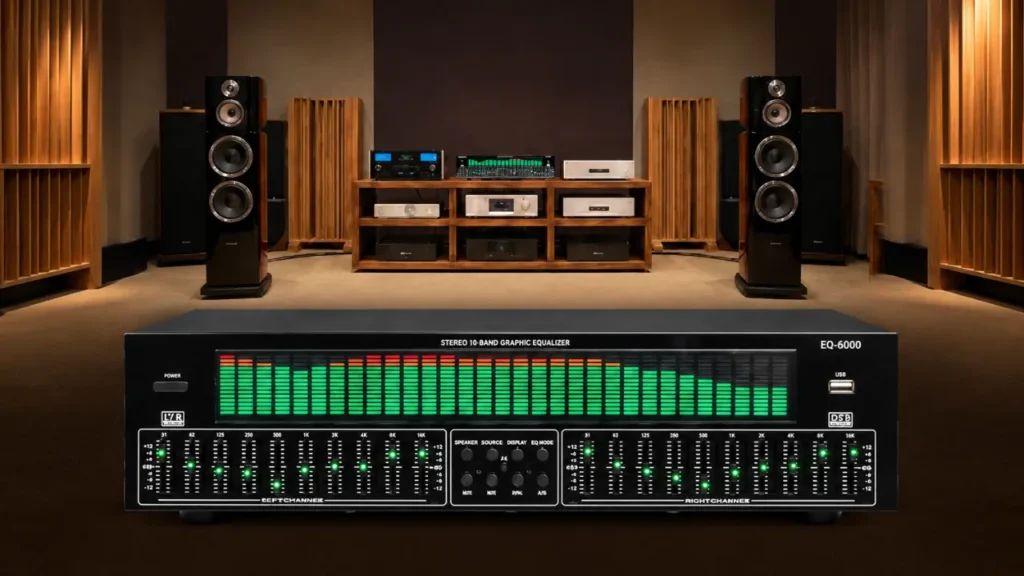
A 10-band or 31-band graphic EQ can also provide finer frequency adjustment, although that additional control comes with a steeper learning curve.
There is no prize for using the most complicated EQ available.
For basic tonal correction, four bands can be enough. For detailed sound design or corrective work, more precise tools may be justified.
The right choice depends on the problem you are trying to solve.
The Other Meaning of Quad Equalizer in Electronics
Audio is not the only field where the phrase appears.
In high-speed electronics, a quad equalizer can describe a four-channel signal-conditioning device. Instead of adjusting audible bass or treble, this type of circuit compensates for frequency-dependent losses that affect high-speed electrical data traveling through cables, PCB traces, connectors, or other transmission paths.
That is a completely different application.
High-speed signals can lose important high-frequency components as they travel through a lossy channel. Equalization is used to compensate for that degradation before the receiver processes the signal.
A four-channel device can perform this type of compensation across four data paths.
So if you encounter the phrase quad equalizer in semiconductor documentation or high-speed interface design, do not assume it is an audio product.
The surrounding terminology will usually reveal the context. Terms involving data lanes, signal integrity, PCB traces, DisplayPort, PCI Express, backplanes, or high-speed serial links point toward electronics rather than audio.
Quadraphonic Audio Is Another Separate Meaning
There is also a historical audio meaning associated with quadraphonic sound.
In that context, “quad” relates to four-channel playback rather than four frequency bands. Quadraphonic systems were designed around four audio channels, making them fundamentally different from a four-band EQ used to shape one audio signal.
This is worth remembering when researching older audio equipment.
A product description that mentions four speakers, four-channel playback, or quadraphonic recordings may have little connection to the modern four-band EQ concept.
The word “quad” alone is not enough to identify the technology.
Common Mistakes When Adjusting a Quad Equalizer
The first mistake is changing every band immediately.
The second is assuming that more bass automatically means better sound. It may make the first few seconds of a track more exciting while masking vocals and other details.
Another mistake is copying settings without considering the equipment. Headphones, speakers, rooms, recordings, and personal preferences differ.
It is also easy to confuse a frequency problem with a volume problem. If everything sounds too loud, EQ is not necessarily the answer. Lowering the overall volume may be more appropriate.
Finally, do not ignore the physical setup. Speaker placement and room acoustics can have a major effect on what you hear.
The Best Way to Think About Quad Equalization
A good quad equalizer should make a problem less noticeable, not make the EQ itself the main attraction.
Four bands are enough to make meaningful changes when you know what you are listening for. Low frequencies can be controlled, muddy areas can be reduced, vocals can gain presence, and excessive brightness can be softened.
But the strongest results usually come from modest changes.
If a setting sounds dramatically different, ask whether it actually sounds better or simply sounds louder and more exaggerated. Then bypass the EQ and listen again.
That simple habit separates useful equalization from endless knob turning.
Final Takeaway
The value of a quad equalizer comes from controlled adjustment, not from pushing every frequency band to its limit. Four-band audio EQ offers a practical balance between basic bass-and-treble controls and much more complicated equalization systems.
The bigger lesson is to check what “quad” means before judging the equipment. It can describe four frequency bands, four audio channels, quadraphonic playback, or four high-speed electronic signal paths. Those applications share terminology but perform very different jobs.
For everyday audio, start flat, identify one genuine problem, make a small change, and compare it with the untouched signal. If the result sounds clearer without calling attention to the EQ itself, you are probably doing it right.
FAQs
1. Can I use one quad equalizer setting for both headphones and speakers?
It is better not to assume the same setting will work for both. Headphones and speakers interact with the listener and environment differently, so a setting that improves one system can make another sound unbalanced.
2. Why does my quad equalizer have different frequency labels from another model?
Manufacturers can choose different center frequencies, filter types, and bandwidths. “Four-band” describes the number of bands, not a universal set of frequency points.
3. Does increasing the high band always make audio sound clearer?
No. A small increase can add brightness, but too much can make vocals, cymbals, and other high-frequency sounds harsh. Clarity is about balance, not simply adding treble.
4. Can EQ compensate for a bad speaker position?
Only to a limited degree. EQ can change tonal balance, but it cannot fully replace sensible speaker placement or address every acoustic problem in a room.
5. How can I tell whether an EQ adjustment actually helped?
Turn the EQ off and compare the result at a comfortable listening level. If you can identify a specific improvement rather than simply hearing a louder or more dramatic sound, the adjustment is more likely to be useful.